
RAMS and COSHH for cleaning jobs, done in seconds
Pick the cleaning tasks or the products on the trolley and G8 ONE drafts the RAMS or COSHH assessment for you to check. Sign it, send it to your client and get on with the clean, from a phone or a computer.
How it works
The same four steps for a RAMS or a COSHH assessment.
Pick the job or products
Choose cleaning tasks such as a builders clean or a washroom deep clean, or type the chemicals you'll use.
Review the draft
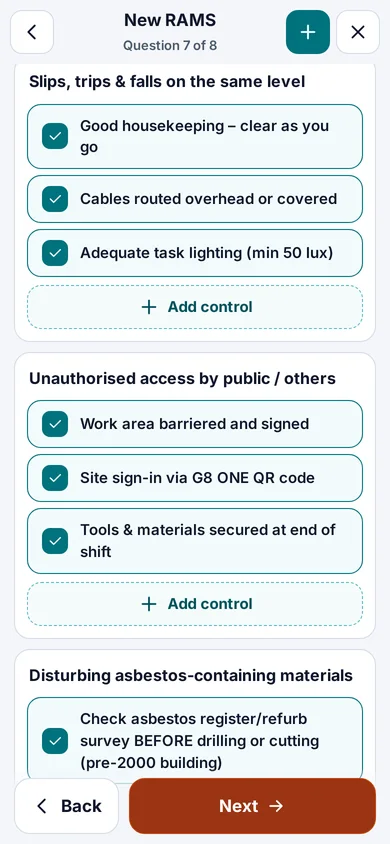
Hazards, controls, method steps and PPE are filled in for you to check and edit.
Sign
Approve it, and your cleaners sign on their own phone with a finger.
Share
Send the PDF or a sign-off link to your client or main contractor. They don't need an account.
Cleaning RAMS in seconds
Pick the Cleaning & FM trade and the tasks on the job. Hazards, risk scores, controls, method steps, PPE and emergency details are drafted from the built-in task library in seconds, ready for you to check and edit. Add other trades to the same RAMS if the job needs them.
- A competent person checks and edits every RAMS before it goes out
- Cleaners read and sign on their phone, with no app to install
- Your client or main contractor signs it off by email link
- A branded PDF with your logo, ready to send
| Cleaning task in the RAMS library | Typical use |
|---|---|
| Builders clean | Sparkle and handover cleans at the end of a build or fit-out |
| High-level cleaning | Cleaning at height, from steps, towers or a MEWP |
| Washroom deep clean | Periodic deep cleans of toilets and washrooms |
| Floor scrubbing | Machine scrubbing and polishing of hard floors |
COSHH for the chemicals on the trolley, in seconds
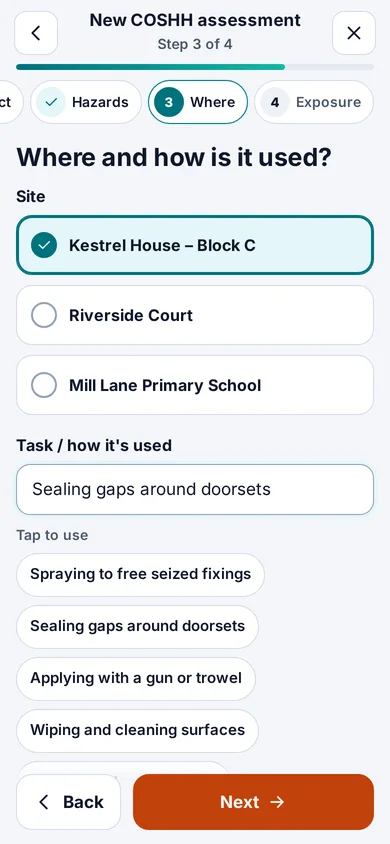
Type the product name and pick its safety data sheet from the shared library. The library is added to every day and includes cleaning chemicals from Evans Vanodine, Selden, Jangro, Prochem and Diversey. Answer where, how and how often it's used, and the assessment is drafted for you to check and approve, following the HSE COSHH Essentials method.
- Each library sheet keeps the supplier link and the date it was last checked
- A nightly check flags newer supplier revisions for review and re-signing
- Upload your own sheets in bulk, as PDFs or phone photos
- QR labels for the cleaning cupboard, and a share link for a site's COSHH file
Also included
The rest of your safety paperwork sits in the same account.
Lone working
Start a timed lone working session for a cleaner working alone or out of hours. If a check-in is missed, the session turns red on every manager's dashboard.
Site sign-in and induction
Cleaners sign in by QR code and sign inductions and briefings with a finger, in 10 languages (4 native-reviewed).
Training and cards
COSHH, manual handling, working at height and CSCS cards in one matrix, with reminders 60, 30 and 7 days before anything expires.
Inspections and schedules
Schedule routine checks per site, complete them on a phone with photos, and turn failed items into actions with an owner.
Permits when they are needed
Raise a permit to work when a client or site asks for one, such as work at height, and get it approved by email link.
Toolbox talks and incidents
Deliver plain-English talks based on HSE guidance and report accidents and near misses from a phone.
Set up for cleaning from sign-up
Choose Cleaning and security as your industry when you sign up. COSHH, schedules, inspections, lone working, toolbox talks, incidents, sites and team records are pinned at the top of the menu, and the COSHH and RAMS suggestions start with cleaning products and tasks. Everything else is under More, and owners and admins can change the layout in Settings.
Questions
How quickly can I make a RAMS for a cleaning job?
Pick the Cleaning & FM tasks and the draft is ready in seconds. You then check and edit it, sign it and send it to your client.
Which cleaning chemicals are in the SDS library?
The shared library of UK safety data sheets is added to every day and includes products from Evans Vanodine, Selden, Jangro, Prochem and Diversey. If a product isn't there, upload the supplier's sheet and G8 ONE drafts the assessment from it.
Does G8 ONE write the COSHH assessment for me?
It drafts it from the safety data sheet and your answers using the HSE COSHH Essentials method. You check the draft against the sheet and approve it.
Is there a cleaning option at sign-up?
Yes. Choose Cleaning and security as your industry and COSHH, schedules, inspections, lone working and team records come first. Facilities management and maintenance is also available.
Do my cleaners need to install an app?
No. They scan a QR code or tap a link and it opens in their phone's browser.
RAMS and COSHH for your next cleaning job, in seconds
Choose Cleaning and security at sign-up and make your first RAMS or COSHH assessment.
No card needed. 30-day free trial, then choose a plan.