
The RAMS app that works on every phone on site
Build a RAMS in the van, brief the team at the gate and collect signatures on screen. G8 ONE runs in the phone's browser, so operatives never need to download anything.
Made for a phone first, not squeezed onto one
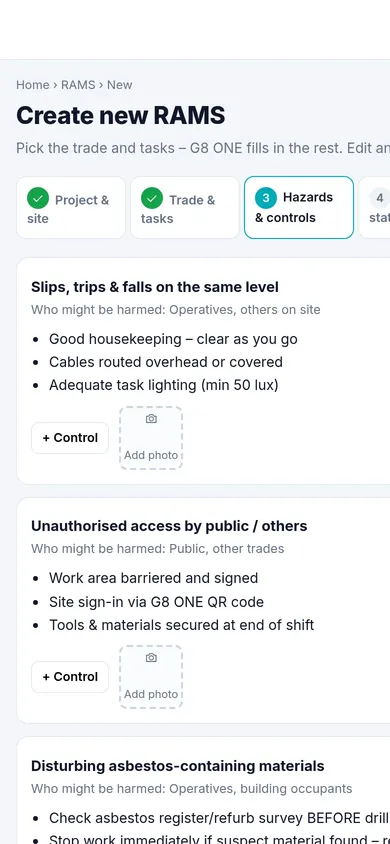
The RAMS builder is a step-by-step flow with big buttons, so it works one-handed on a 6-inch screen. Drafts save as you go, both on the phone and to the real RAMS record, so a dropped signal in a basement doesn't lose your work.
- Tap to pick trades and tasks; type or dictate your own
- Tap the mini-preview at any step to see the full document
- Download the PDF, share it or send it for sign-off from the last step
- The same RAMS opens on the office laptop with nothing to sync
Briefings and signatures at the gate
The supervisor briefs the team and each operative confirms the key points and signs with a finger. Prefer them to read it first? Send a link and they sign on their own phone. Each signature is stored against that version of the RAMS.
Operatives don't need a G8 ONE login or a paid seat on Team and above. They can also scan in at the site QR code, do the induction and report a near miss in the same browser.
Clients and principal contractors
Send the RAMS for sign-off by email. The approver opens a secure link, reads the RAMS, downloads the PDF and approves with their name and signature, or asks for changes, with no account needed.
What you can do from the phone
Build a RAMS
All nine steps, from job details to a finished document.
Check the team
See whose cards are in date for the job before you add them.
Share a view-only copy
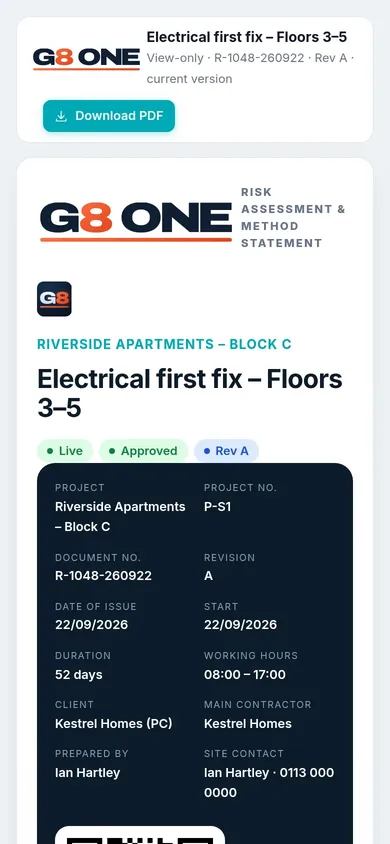
Every PDF page has a QR code that opens the current revision.
Send for sign-off
Pick the approver and send. See when it was sent and resend a reminder.
Collect signatures
Finger signatures on your device, or by link on theirs.
Raise the permit
Hot works, work at height, isolation and more, linked to the job.
Questions
Is there an app to download from the App Store or Google Play?
G8 ONE runs in the browser on iPhone and Android, so there is nothing to install. You can add it to your home screen like an app.
Does it work with a weak signal?
Drafts save on the phone as you type and sync to the RAMS record when there is a connection.
Are you the same company as RAMS App?
No. RAMS App is a separate product from another company. We have a factual comparison on our G8 ONE vs RAMS App page.
Can operatives use their own phones?
Yes. They open a link or scan a QR code and sign in their phone's browser. They don't need an account.
Try it on your own phone
Open G8 ONE on your phone, build a RAMS for a real job and send it to yourself for sign-off.
No card needed. 30-day free trial, then choose a plan.