
RAMS software that gets you through the gate
Pick the trade and tasks. G8 ONE drafts the hazards, controls, PPE and method statement, checks every operative's cards against the job dates, and sends the RAMS for sign-off to people who don't need an account.
Built for the subcontractor who writes the RAMS
Most RAMS tools are made for main contractors to collect and review documents. G8 ONE is made for the firm that has to write them, often at night, for a principal contractor who wants them yesterday.
You answer nine short steps: the job, the trades, the tasks, the site, the dates and team, the hazards, the controls and PPE, the method statement, and a final check. Each step has a + Add your own option, and the draft saves as you go, so you can stop on site and finish in the office.
- Postcode lookup adds the nearest A&E and flags pre-2000 buildings for asbestos checks
- Hazards, risk scores and controls from a built-in library for common UK trades
- Suggested permits and toolbox talks from the tasks you pick
- Photos on any hazard or method step
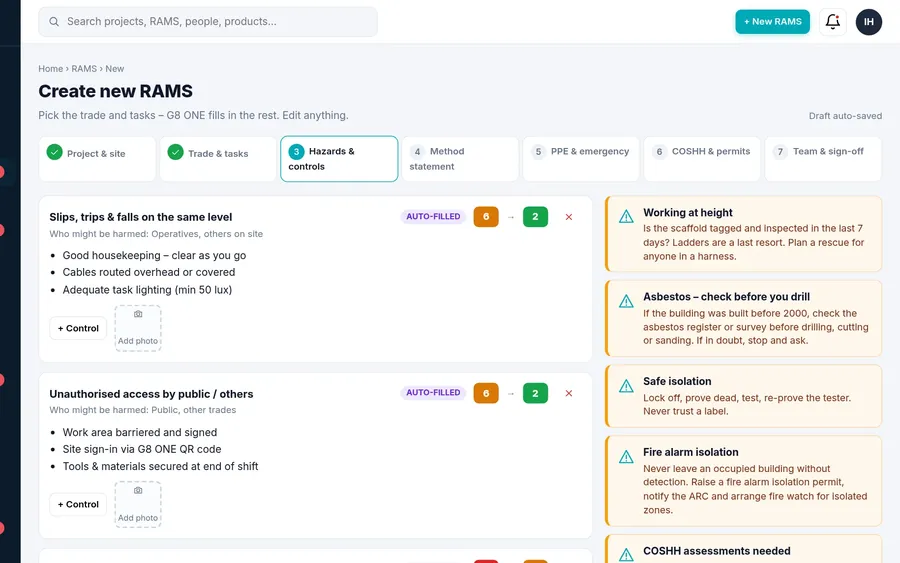
The nine steps
The order follows how a site manager actually reads a RAMS, so nothing important is buried at the back.
| Step | What happens |
|---|---|
| 1. Job | Title and short description of the works. |
| 2. Trades | Pick one or more trades, including fire doors, fire stopping, fire alarms, fire dampers, sprinklers, electrical, plumbing, dry lining and more. |
| 3. Tasks | Tick the tasks for this job or add your own. Tasks drive the hazards, PPE and method steps. |
| 4. Site | Choose a site or enter a postcode. Address, nearest A&E and building age come back. |
| 5. Dates and team | Pick the people going to site. Each person's cards are checked live against the job dates, so an expired CSCS or IPAF card is flagged before the RAMS goes out. |
| 6. Hazards | Hazards from the library for your tasks. You can also ask for suggested hazards: they are labelled as suggestions and nothing is added until you tick it. |
| 7. Controls and PPE | Controls for each hazard and the PPE the tasks need, all editable. |
| 8. Method statement | A step-by-step sequence built from the tasks. Reorder, edit or rebuild it. |
| 9. RAMS ready | Preview the full document, then download the PDF, share it or send it for sign-off. |
Sign-off by people who don't have an account
Send the RAMS to the person who approves it: your client, the principal contractor's site manager or your own safety adviser. They get an email with a secure link. No G8 ONE account is needed. They can read the full RAMS, download the PDF, then approve it with their name and signature or ask for changes.
You see "Sent for sign-off to … · date" on the RAMS, can resend a reminder, and can set a default approver for your company. If the RAMS changes after it was sent, G8 ONE asks you to send the new version: earlier links stop working, so nobody signs off an out-of-date revision.
Operatives sign on their own phone
Operatives read the key points and sign the briefing with a finger, on your device or from a link. No app to install and no paid seat for them on Team and above.
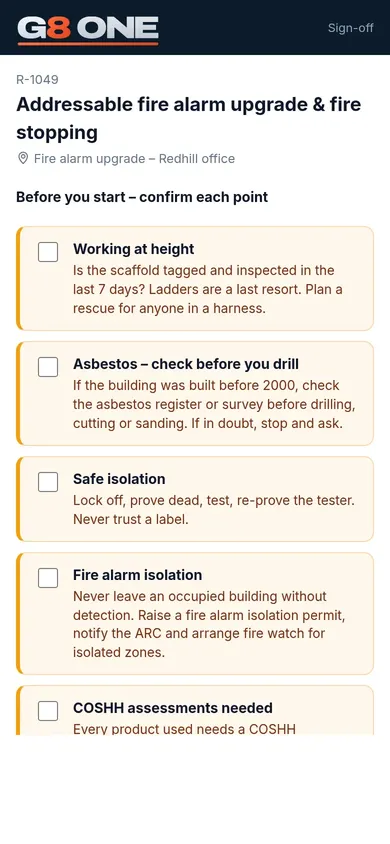
Pre-export safety check
Before a RAMS is issued, G8 ONE lists likely gaps to review, such as no rescue plan for work at height or no fire watch after hot works.
QR code on every page
Every PDF page carries a QR code that opens the view-only digital RAMS, so people on site always see the current revision.
Score your old RAMS
Import a RAMS you already use and it is scored out of 100 with a list of gaps, so you can see what to bring up to date.
Reuse last job's RAMS
Duplicate a RAMS, change the site and dates, and send it. Reusing a previous job takes about a minute.
Linked risk register
Link RAMS to items in your risk register. When an item is updated, RAMS that use it are flagged for review.
Your branding
Your logo and colours on every PDF from the Business plan up.
Questions
Does G8 ONE write the RAMS for me?
It drafts it from your trade and tasks using a built-in library, and can suggest extra hazards. You stay in control: everything is editable, and a competent person must review every RAMS before it is issued.
Can my client sign off a RAMS without an account?
Yes. They get an email with a secure link, can read and download the RAMS, then approve it with their name and signature or ask for changes. If you change the RAMS, you send the new version and the old link stops working.
Do operatives need to download an app?
No. They open a link or scan a QR code in their phone's browser and sign with a finger.
Will a main contractor accept a G8 ONE RAMS?
G8 ONE produces professional, branded PDFs. What each main contractor accepts is up to them, and you can edit every section to match their format before you send it.
How much does it cost?
Plans are per company: Solo £29/month, Team £79, Business £199, Enterprise £499 and Ultimate £999, or two months free on annual billing. No card needed. 30-day free trial, then choose a plan.
Write your next RAMS in G8 ONE
Start with the job you're pricing this week. Everything you set up carries over when you choose a plan.
No card needed. 30-day free trial, then choose a plan.