
Permit to work software with approvals that actually happen
Raise the permit from the job, send it to the person who approves it, and get a signed decision back. They don't need a G8 ONE account. Then issue, suspend, hand back and close it with signatures.
Permits that live with the job
Each permit type comes with its pre-start checks, and your RAMS suggests the permits the tasks need.
- Hot works, with a fire watch
- Work at height and roof work
- Electrical isolation, with a lock-out tag-out (LOTO) register
- Permit to dig
- Confined space entry
- Fire alarm isolation
Issue, accept, suspend, hand back and close permits with signatures and checklists. Live permits and permits waiting for approval are clear at a glance.
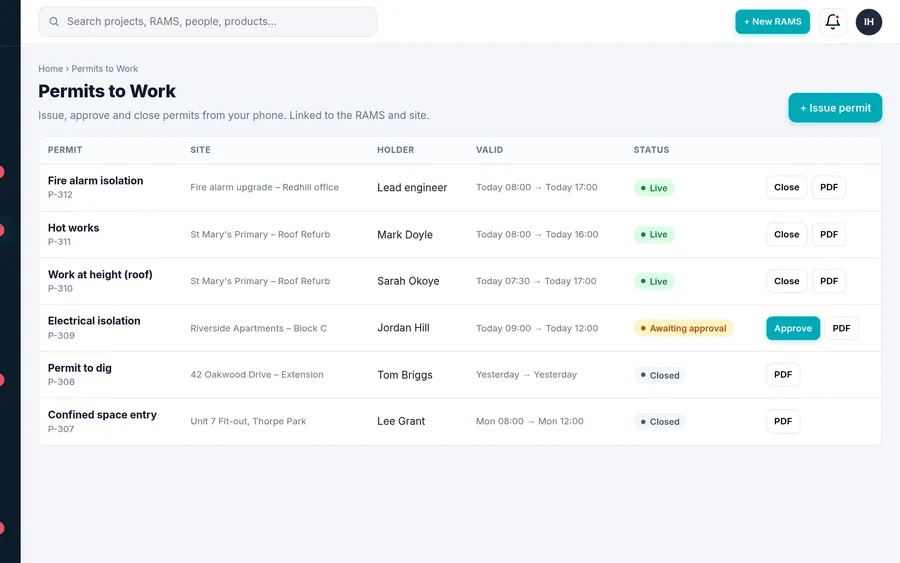
Approval by the right person, with a record
Only an owner, admin or manager can send a permit for approval. Pick the approver, or set a default approver for your company, and G8 ONE emails them a secure link.
The approver reads the permit, ticks to confirm and signs, or rejects it with a comment. The permit shows "Approved by … · date and time" or "Rejected by … – reason". Links expire, and if you cancel the request the link stops working.
No account for approvers
Clients, building managers and principal contractor staff approve from the email link.
Signed decision
Name, signature, time and any comments are stored on the permit.
Approve from your phone
Managers inside G8 ONE can approve on their phone too.
Fire alarm isolation on live buildings
For fire and security work, the fire alarm isolation permit is agreed with the building manager. The RAMS adds the matching controls: isolate one zone at a time, fire marshals or a fire watch on isolated zones, the alarm receiving centre and client told before and after, and the system tested and handed back the same day.
Questions
Who can approve a permit?
Anyone you send it to. They get an email with a secure link and approve or reject it with their name and signature. They don't need a G8 ONE account.
Can a permit be suspended?
Yes. Permits can be issued, accepted, suspended, handed back and closed, each with a signature.
Which permit types are included?
Hot works, work at height and roof work, electrical isolation (LOTO), permit to dig, confined space and fire alarm isolation.
Does it link to the RAMS?
Yes. The RAMS suggests permits from your tasks, and hot works or isolation steps go into the method statement.
Raise your next permit in G8 ONE
Send it for approval and see the signed decision come back.
No card needed. 30-day free trial, then choose a plan.