
Fire door inspection app with QR tags and an audit trail
Register each door, print its QR tag and inspect it on a phone: Pass, Repair or Fail for every check, with photos. Failed items become remedial actions, and the next inspection date is worked out for you.
Every door, every check, on record
Add each door with its location, rating (for example FD30S) and certification label, and a photo. G8 ONE gives it a QR tag to print. Scan the tag and the inspection opens on that door.
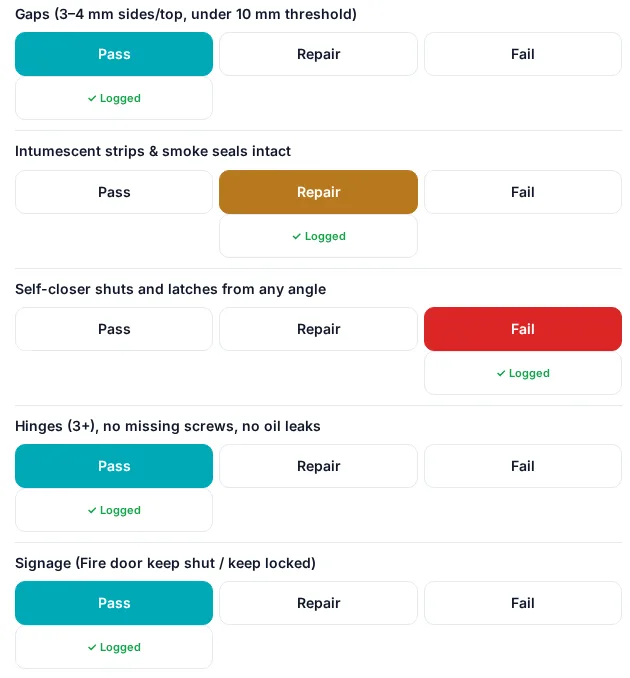
Each check gets Pass, Repair or Fail:
- Gaps (3–4 mm at the sides and top, under 10 mm at the threshold)
- Intumescent strips and smoke seals intact
- Self-closer shuts and latches from any angle
- Hinges (3 or more), no missing screws, no oil leaks
- Signage (Fire door keep shut / keep locked)
- Glazing and beads intact and fire-rated
- Certification label or plug present
- Leaf and frame undamaged, no unauthorised holes
Add notes and photos, save, and the door's history and next due date update straight away.
Intervals that follow the rules for the building
Choose an interval for each door. The options follow the Fire Safety (England) Regulations 2022, which require quarterly checks of communal fire doors and best-endeavours annual checks of flat entrance doors in multi-occupied residential buildings in England with a storey above 11 metres.
| Interval | Typical use |
|---|---|
| Every 3 months | Communal fire doors – England, residential buildings over 11 m |
| Every 12 months | Flat entrance doors – England, residential buildings over 11 m |
| Every 6 months | Common for other buildings, following your fire risk assessment and BS 8214 |
| Monthly | Heavy-traffic areas |
Intervals follow current guidance. Always confirm them against the building's fire risk assessment.
Access attempts
When you can't get into a flat, log the attempt as a letter, knock or visit, phone call, email or text. The door keeps the list, so you can show best endeavours if a resident doesn't let you in.
Remedial actions
Failed checks become remedial actions with a priority, assignee, due date, before and after photos and close-out sign-off.
Fire door report
One report per site: door, location, rating, certification, last inspection, result, failed or repair items and next due date. Print it or save it as a PDF.
QR tag sheets
Print a single tag or an A4 sheet of tags for every door on the site.
Company audit
Doors that failed or need repair show in the company content audit.
Part of the job
The same app holds the RAMS, permits and Site Pack for the fire door job itself.
A record of checks, not a certificate
G8 ONE records visual checks and what happened next. It does not certify a doorset. Third-party certification and detailed surveys remain with the certification body and a competent inspector.
Questions
Does the app follow the 11 metre rule?
Yes. You can set communal doors to every 3 months and flat entrance doors to every 12 months, matching the Fire Safety (England) Regulations 2022 for multi-occupied residential buildings with a storey above 11 m. Other buildings can use 6-monthly or monthly intervals, following the fire risk assessment.
How do I record that a resident wouldn't let me in?
Log an access attempt on the door: letter, knock or visit, phone call, email or text. The list stays with the door as evidence of best endeavours.
Can I print QR tags for doors?
Yes, one at a time or as an A4 sheet for every door on the site. Scanning the tag opens the door's inspection.
Does it replace BM TRADA or FIRAS certification?
No. It records inspections, defects and remedials. It is not a certification scheme.
Put your fire doors on record
Add a site, register its doors and print the QR tags tonight.
No card needed. 30-day free trial, then choose a plan.