
A noise meter on every site phone
Hold up your phone next to the disc cutter or breaker and see the sound level in decibels. Save the reading with the worker, the tool and how long they were exposed, then work out their daily noise exposure against the Control of Noise at Work Regulations 2005.
Measure with your phone
Open HAVs & noise and tap Measure with my phone. G8 ONE uses the phone's microphone in the browser, so there is nothing to install. While it runs you see the level now, the average (Leq), the peak and the time measured, with a bar that turns amber at 80 dB and red at 85 dB.
Stop the measurement and the average goes straight into the noise exposure calculator. Save it to the record with:
- What and where, for example disc cutter, level 2
- The worker using the machinery
- The tool or plant, from your tools and plant register
- Time exposed today, in minutes
- The site
Owners, admins and managers can edit or delete saved readings. The measured values themselves can't be changed, and every edit is kept in the audit trail.
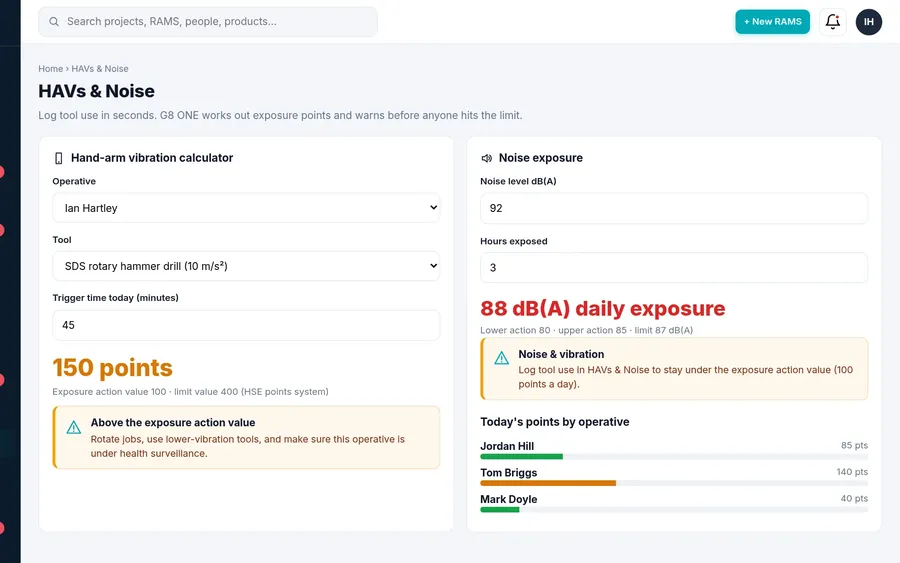
Daily noise exposure and the action values
Enter the average noise level in dB(A) and the hours exposed, and G8 ONE works out the daily personal noise exposure, LEP,d, normalised to an 8-hour day. You can add a peak sound pressure in dB(C) as well.
| Value | Daily exposure | Peak |
|---|---|---|
| Lower exposure action value | 80 dB(A) | 135 dB(C) |
| Upper exposure action value | 85 dB(A) | 137 dB(C) |
| Exposure limit value | 87 dB(A) | 140 dB(C) |
The result turns amber from 80 dB(A) and red at 87 dB(A). The action values are judged on the noise at the ear without hearing protection. Only the limit values take account of the hearing protection worn. At 85 dB(A), or 137 dB(C) peak, G8 ONE prompts you to plan the controls.
An indicative guide, not a certified meter
A phone reading is an indicative guide only. G8 ONE is not a certified Class 1 or Class 2 sound level meter. Phone microphones vary from model to model and limit very loud sounds, so a phone can read low next to the loudest tools.
Use it to spot the jobs and areas that need a proper look. For a formal noise risk assessment, use a calibrated Class 1 or Class 2 meter or a noise dosimeter, operated by a competent person. You can set a calibration offset in the app to bring your phone closer to a calibrated meter you have checked it against, but that still doesn't make it a certified instrument.
HSE guidance
Questions
Is a phone accurate enough to measure noise at work?
Only as an indicative guide. Phone microphones vary and limit loud sounds, so G8 ONE's readings are not a substitute for a calibrated Class 1 or Class 2 sound level meter. Use a calibrated meter for formal noise risk assessments.
What is LEP,d?
LEP,d is a worker's daily personal noise exposure, normalised to an 8-hour day. G8 ONE works it out from the average level in dB(A) and the hours exposed.
Which values does G8 ONE warn at?
The Control of Noise at Work Regulations 2005 values: lower exposure action value 80 dB(A), upper exposure action value 85 dB(A) and exposure limit value 87 dB(A), plus the peak values of 135, 137 and 140 dB(C).
Can I record who was exposed and to which tool?
Yes. Each saved reading can carry the worker, the tool or plant, the time exposed in minutes and the site.
Do I need to install an app?
No. The meter runs in the phone's browser over a secure connection. Allow microphone access when the phone asks.
Does it replace hearing protection or a noise assessment?
No. It helps you spot noisy work and keep a record. You still need to assess the risk, reduce noise as far as reasonably practicable and provide hearing protection where the regulations require it.
Check site noise from your phone
Try the noise meter and HAVS logging free for 30 days. No card needed.
No card needed. 30-day free trial, then choose a plan.