
Software for fire door installers who work on Tier 1 sites
Write the RAMS for the install, inspect the doors you've fitted or maintain, close out the remedials and send the main contractor a complete Site Pack, all from one app.
RAMS written for doorsets, not generic joinery
The fire doors trade in the RAMS builder has its own tasks, so the hazards, PPE and method steps fit the work you actually do.
| Task in the library | What it brings into the RAMS |
|---|---|
| Remove old doorsets | Manual handling, dust and the asbestos check for pre-2000 buildings |
| Install FD30/FD60 doorsets | Manual handling, drilling and fixing, and fire door installation prompts |
| Ironmongery and closers | Drilling and manual handling controls |
| Fire-stop frame gaps | Dust and COSHH for mastics and sealants |
| Smoke seals and intumescent strips | Fire door prompts for the seals |
| Gap checks and certification | Fire door inspection prompts |
| Fire door inspection | Links the job to fire door inspections |
Inspect, tag and report
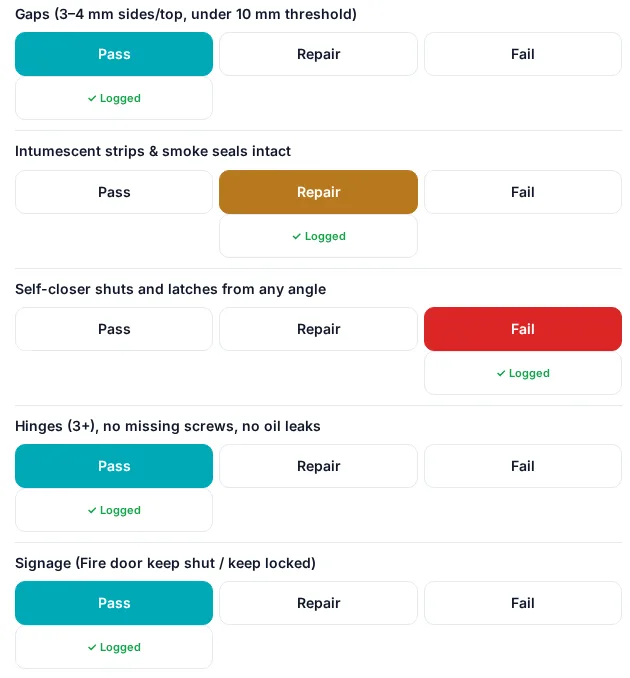
Register every door with its rating and certification label, print a QR tag and inspect on a phone. Each of the eight checks is Pass, Repair or Fail with photos. Failed checks become remedial actions with an owner, due date and before and after photos.
- 3-month communal and 12-month flat entrance door intervals for 11 m+ residential buildings in England
- Access attempt log for flats you can't get into
- A printable fire door report for the client
Cards checked against the job
CSCS, BM TRADA Q-Mark fire door installer, FIRAS installer and other cards are checked against the job dates when you pick the team.
Fire-stopping and dampers
Templates for fire-stopping surveys per penetration and fire damper drop tests sit alongside the door checks.
Site Pack
Insurance, accreditation certificates, RAMS, COSHH and the training matrix in one indexed PDF.
Fire doors on your main tabs
Pick Fire doors as one of your services at sign-up and Fire doors sits on the phone's bottom bar next to Home, Scan, RAMS and More, and near the top of the desktop menu. Add other services, such as fire alarms or extinguishers, and the second tab follows them. Owners and admins can change the choice in Settings.
Questions
Is there a RAMS template for fire door installation?
The RAMS builder has a fire doors trade with tasks for removing old doorsets, installing FD30/FD60 doorsets, ironmongery and closers, fire-stopping frame gaps, seals and gap checks. Try a simple version with our free RAMS template.
Can I inspect doors after I've installed them?
Yes. Register the doors, print QR tags and record inspections with Pass, Repair or Fail for each check.
Does G8 ONE certify doorsets?
No. It records installs, inspections and remedials. Certification stays with your third-party scheme.
Run your fire door jobs in one place
RAMS, inspections, remedials and the Site Pack, with a 30-day free trial.
No card needed. 30-day free trial, then choose a plan.